
Help
Before you start
Do I need an account?
No. Tervaya has no account. Your trips are on your phone, and whoever joins a shared trip only needs a name.
Does it work without a connection?
Yes. Logging, the budget and settling up work offline. The day's rates and what others added to a shared trip arrive once you are back online.
Joining a shared trip, Smart and finding places by name need a connection.
What does Pro add?
Everything a trip needs stays free. Pro adds what goes beyond one trip, or costs us money every time it's used.
Travel doesn't come monthly, so there is no subscription. The pass costs €3.99 and gives every trip Pro for 30 days, then ends by itself. Pro for ever costs €29.99, paid once.
- Say it or type itA whole sentence in your own words, with who paid and when. Nothing is cut off when you stop to think.
- Several at onceCoffee, taxi and museum in one sentence become three expenses.
- Scan receiptsA photo becomes the expense, with amount, date and category.
- Receipts, item by itemOn a trip with others, each item goes to whoever had it.
- Card payments, already filled inOn every trip, each one waits for a single tap.
- Places on the map and by nameSet the pin where you were, or find last night's restaurant by its name.
- Add the place by itselfFor every new expense.
- What a day of travel costs youThe cheapest and the dearest trip, how this one compares, and your years side by side.
- One search, every tripFind that dinner in Lisbon, even years later.
- Plan with your last trip thereThe budget helper knows what a day cost on your last trip there.
- Switch phones, keep every tripBacked up by itself to your own Drive, with every receipt photo.
Scanning and saying 50 times with every pass and 150 times with Pro for ever, and 5 times to try without.
Both prices are for Germany and include VAT. On Android you buy Pro on Google Play, which shows the price for your country and your right of withdrawal. Tervaya is not in the App Store yet.
When the pass ends, nothing is lost. Logging and the way to your own data stay free, and what you log with Pro stays.
How does Tervaya make money?
Pro pays for Tervaya. No ads, no account, and we never sell your data.
Is there a limit?
Any number of trips, free. A shared trip has room for 20 people.
What is Tervaya not made for?
Tervaya is made for trips. It is not a trip planner or an accounting tool, and not for a flat share or monthly bills. It sends no payment requests, has no version for the browser and reads no exports from other apps.
Logging
Can Tervaya read my receipts?
With Smart, yes. AI reads the receipt through our service in the EU, which keeps none of it. Amount, currency and date come only from what is printed, and the category from what kind of shop it is. Without a clear total, the amount stays empty.
Tervaya checks that the items add up to the total. Before you save, you see the amount, the shop and the category, and Edit shows you everything in the form.
On a trip of two or more, you give each line to whoever had it. Tip, service and tax follow everyone's share.
Smart has 5 free readings for receipts and for saying or typing an expense or a cash movement. Then it comes with Pro, 50 times with every pass, 150 times with Pro for ever. If Smart fails or finds nothing to log, the reading doesn't count. If the answer doesn't reach your phone, for example because you close the bar, the form or the camera, the connection drops or your phone stops waiting, the reading may still count. The photo itself is always free and stays with the expense.
We paid the hotel for five nights at once. Is today's budget gone?
No. Spread it over the nights it covers, and each day carries its part. Give the expense the day of the first night. Under When, Tervaya then offers to spread it over the nights, and you can change how many. If it offers nothing, tap “Spread over several days” there.
Something was refunded. How do I log it?
Hold the expense under Expenses and choose Log a refund, or open it and find Log a refund under ⋯. The refund stays linked to the expense.
Card payments
On Android
Card payments from listed bank and wallet apps wait in Tervaya for a tap while a trip runs.
- Tervaya › Settings › Card payments › Allow in Android settings
- Tervaya in the list › Allow notification access › Allow
Back in Tervaya, card payments say On.
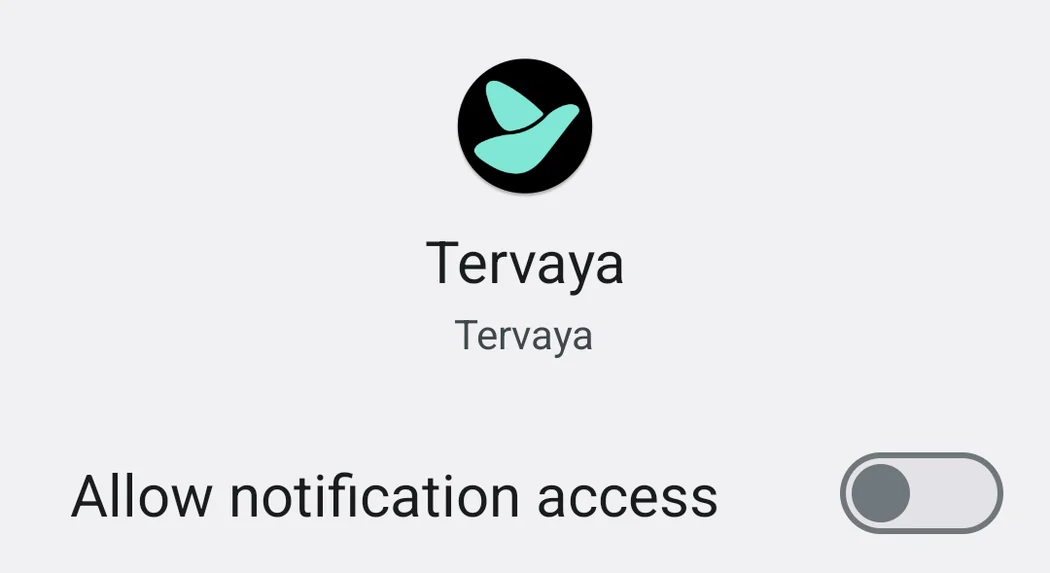
Nothing arrives? Then turn on the notification for card payments in your bank app.
Is the card payments row missing? Then Tervaya does not know your bank app yet. Write to us which one it is.
Which banks we have checked, and where a bank asks you to turn its notification on, stands in the guide to card payments. To the guides ›
Without Pro, card payments wait on the first trip they arrive on, for 30 days from the first payment.
What Tervaya reads
What is read. The notifications of listed bank and wallet apps. Those that name an amount are held on this phone until you next open Tervaya. Then Tervaya keeps only the amount, currency, merchant and time of a card payment made while a trip runs. The rest is dropped.
Nothing else. Android lets Tervaya see every notification. Tervaya passes over all other apps and keeps nothing of them.
Where it stays. On this phone. Until you add a payment, only its merchant's name goes out, and only if you search for its place by that name.
Turning it off. Any time in Android's settings, under notification access.
On the iPhone with Apple Pay
Pay with Apple Pay at the till while you travel, and the payment waits for you in Tervaya, filled in.
On iOS 27
- In Shortcuts, open “Automation”, tap “+” and then “Edit”.
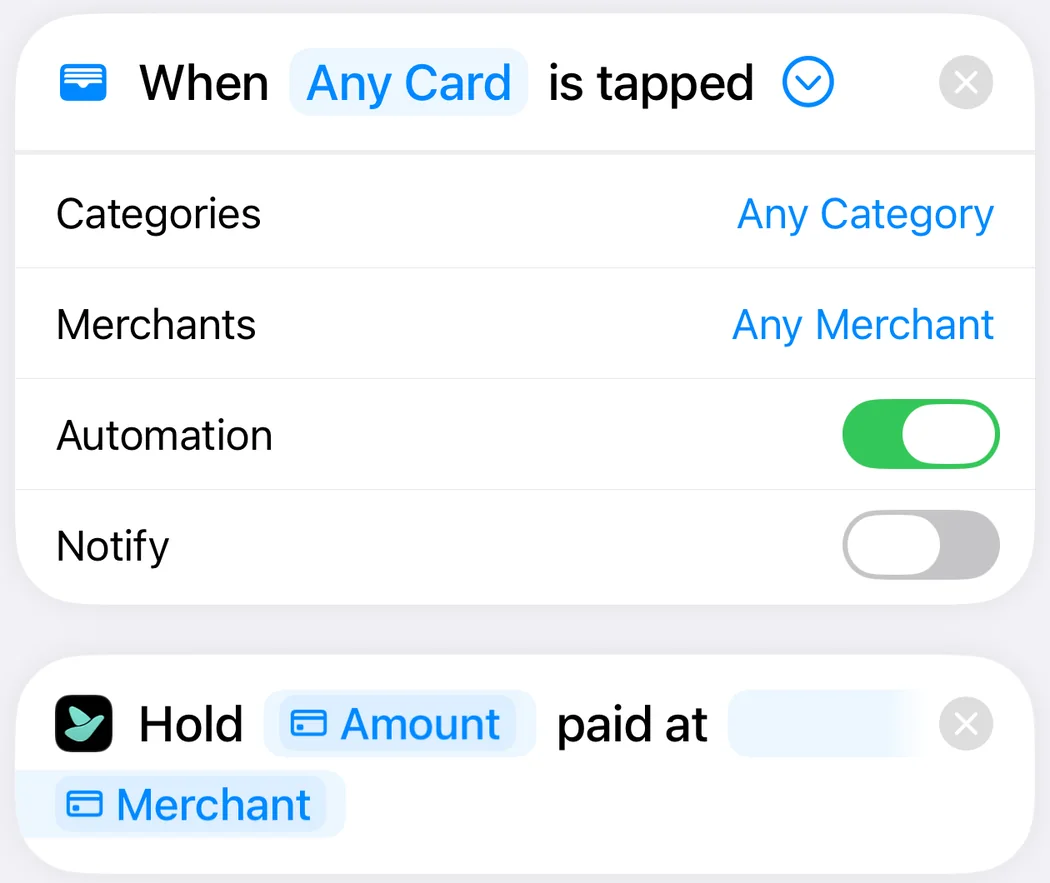
- Under “Automation”, choose “Wallet”. “Any Card” and the switch “Automation” stay as they are.
- Search for Tervaya and add the action “Hold a Payment”.
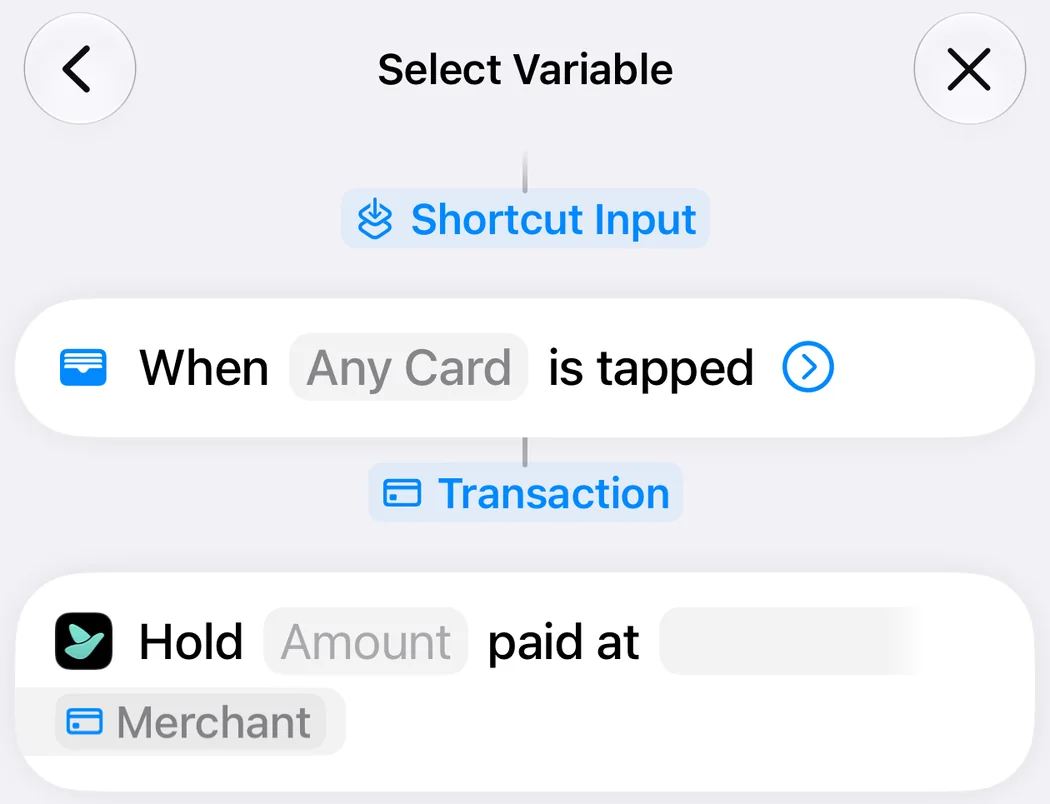
- Tap “Amount”, then “Select Variable” and “Transaction”. Tap “Transaction” once more and pick “Amount”. Do the same for “Merchant”.
On iOS 26
- In Shortcuts, tap “Automation”, then “+”, and choose “Wallet”. Select all your cards and “Run Immediately”, then tap “Next”.
- Tap “Create New Shortcut” and add Tervaya’s action “Hold a Payment”.
- Tap “Amount”, choose “Shortcut Input”, tap it once more and pick “Amount”. Do the same for “Merchant”.
Nothing arrives? Allow mobile data under Settings, Apps, Wallet.
Without Pro, card payments wait on the first trip they arrive on, for 30 days from the first payment.
What Tervaya reads
What is read. The amount and the merchant of a payment at a till, with its time. They wait on this phone until you next open Tervaya, which keeps them only for a payment made while a trip runs.
Nothing else. Tervaya sees only what your automation hands over.
Where it stays. On this phone, until you add it as an expense. Before that, only its merchant's name goes out, and only if you search for the payment's place by that name. Until you delete all data, Tervaya also remembers when the action last ran, to show it in Settings, and sends that nowhere.
Turning it off. Switch off the automation in Shortcuts, or delete it.
Money and currencies
Which exchange rate does Tervaya use?
The latest daily rate. Our service in the EU fetches it once a day, for over 150 currencies, and Tervaya picks it up when it starts. When you save, the rate is fixed, so the balance doesn't move later. Without a connection Tervaya uses the last rates it knows. Your card charged something else? Tap the converted amount under the figure and put in what it cost.
I took cash from an ATM. Is that an expense?
No. Under Cash, record what you withdrew. Every expense you mark as paid in cash comes off it. The machine's fee is an expense, and you put it in right there. Once you pay cash on the trip, you see how long your cash is likely to last. If your bank's notice of the withdrawal turns up under “Waiting for you”, dismiss it there.
Travelling together
How do I invite someone?
Invite with a link or the QR code. Whoever opens it joins under their own name, without an account. Everybody logs on their own phone, and all see the same trip.
Does everybody need Tervaya?
No. Add a person by name and log what they pay yourself. On a trip you don't share, the name never goes into our mailbox. Invite them only if they want to log on their own phone.
Does it work between iPhone and Android?
Yes. A shared trip works across both, everybody on their own phone.
Who can see a shared trip?
Only the people on it. What you share goes encrypted through our mailbox, and only your phones can read it. In the mailbox we see no amounts and no names.
Your budget, your cash, what you spend only for yourself, receipts, and how and where you paid never go into the mailbox.
Can someone else change my expenses?
No. An expense is changed only by whoever entered it. Once that person is no longer in the trip, the organiser can. The organiser also keeps the trip's name, dates and travellers. There are no rights to hand out.
Somebody else can give your expense a place of their own. It stays with that person and never goes into the trip, and your expense does not change.
Why doesn't my invitation work?
Each invitation is for one person, and the first phone that joins with it gets the seat. If it was already used on another phone, or the organiser has made a new one since, it no longer works. Then ask the organiser for a new invitation. Joining needs a connection.
Settling up
How is the balance worked out?
For everybody, Tervaya adds up what they paid for the group and takes off their own share. Whoever is ahead gets money back, whoever is behind pays. Tervaya turns this into only a few payments, and often one is enough.
On a trip for three, Ben laid out €297.24 more for Nora than she did for him, and Nora €40.61 more for Lina. So Lina pays the €40.61 straight to Ben, and Nora pays him the rest, €256.63. Lina pays Ben though he never paid for her, and no money goes round twice.
In the app the reason stands under what you pay or get back, behind “How does this come about?”.
We are two families. Can we settle as families?
Yes. On the trip's Travellers page, make each family one household. On a shared trip the organiser does this. A household settles as one, so between two families there is at most one payment. What each person spent stays their own. Only the two of you on the trip, paying from one purse? Then the trip shows what it cost you together, and nothing is left to settle.
Where does the odd cent go?
Split €10 three ways, and one of you carries €3.34. The shares always add up to the exact amount, so no cent goes missing.
Your data
Where are my trips kept?
On your phone. Only a shared trip is also kept in our mailbox, encrypted so that only its phones can read it, and is deleted there 30 days after its last change. While the trip is under way or still ahead, one of its phones looking in counts as a change. With Pro, you can switch on Google Drive, and your phone backs up to your own Drive by itself.
What happens with a new phone?
Under Settings › Your data › Backup file you write your trips into a file you keep. On the new phone, Restore reads it back. Receipt photos are not in it. With Pro, switch on Google Drive on the same page, and your phone backs up by itself, receipt photos too. On the new phone, choose Restore a backup › From Google Drive.
Whoever started a shared trip gets it back with its recovery code, under Settings › Your data › Bring back a shared trip, as long as the trip is still in our mailbox.
Can I get my expenses as a PDF or a spreadsheet?
A closed trip has its review as a PDF, a shared one also the group's statement. All expenses come as a spreadsheet for Excel under Settings › Your data › Export.
How do I delete everything?
Settings › Your data › Delete all data removes your trips, expenses and settings from your phone. Only a random number for this installation stays, with what it used of Pro and the free readings, so nothing is given twice. A backup in Google Drive stays until you delete it on the same page under Delete backups from Drive.
Another question?
Write to us, we read every message ourselves.
If you write from the app under Settings › About Tervaya, the mail already names the app's version and your phone's model and system version.